![logo.jpg]](https://support.funxtion.com/hs-fs/hubfs/logo.jpg?height=40&name=logo.jpg)
FXGYM – Update Instructions
- Introduction
This update needs to happen ideally before 31-12-2025. It prepares the system to be fully future‑proof for 2026 and beyond.
The update consists of two essential actions:
- Syncing the media player to our new BrightSign network.
- Updating the tablet using the USB stick containing the latest application file.
These steps form the foundation of a significant improvement roadmap planned for next year. This is the first phase of ensuring long-term stability, compatibility, and performance of the solution—more enhancements will follow soon!
- Requirements
- USB stick with update file installed
- Access to the device
- PIN code: 1234
- New registration key
Update Procedure
Step 1 — Insert USB Stick
Insert the USB stick into the black media player.
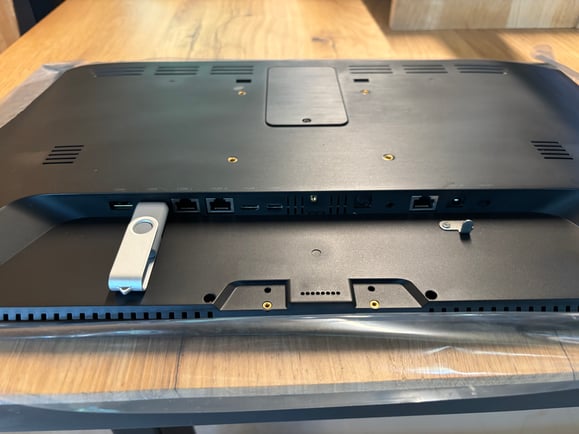
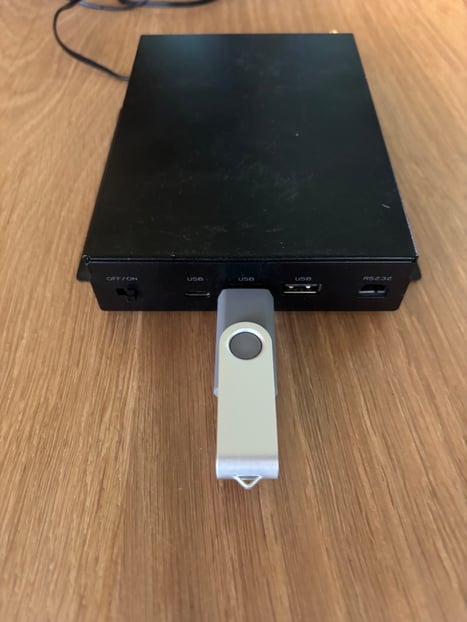
Instruction video:
Step 2 — Open Hidden Menu
Tap the screen 4 times quickly until a popup appears.
Step 3 — Enter PIN Code
Enter 1234 to access the Kiosk settings page.
Step 4 — Open Android Settings
Tap the cogwheel icon in the upper-right corner.
Step 5 — Access Storage
- Navigate to Storage.
- Select the USB drive.
Step 6 — Install Update File
Tap the file com.procoit.kioskbrowser.apk.
Step 7 — Confirm Installation
A popup appears. Select Continue.
Step 8 — Install the Update
Select Install in the bottom-right corner.
After installation completes, the application has been updated.
Re-register the Device
Repeat the earlier steps to open the settings page.
Step 1 — Open Hidden Menu Again
Tap the screen 4 times quickly.
Step 2 — Enter PIN Code Again
Enter 1234.
Step 3 — Navigate to Remote Management
- On the left side, select Remote Management.
- Select Logout.
Step 4 — Register New Device
- Select Register Device.
- Enter the new registration key.
(see provide registration key via email or in the enveloppe)
- Completion
Your device is now updated and registered successfully.
If you encounter any issues, please contact us here!
Funxtion International – All rights reserved.
Website: https://support.funxtion.com/knowledge